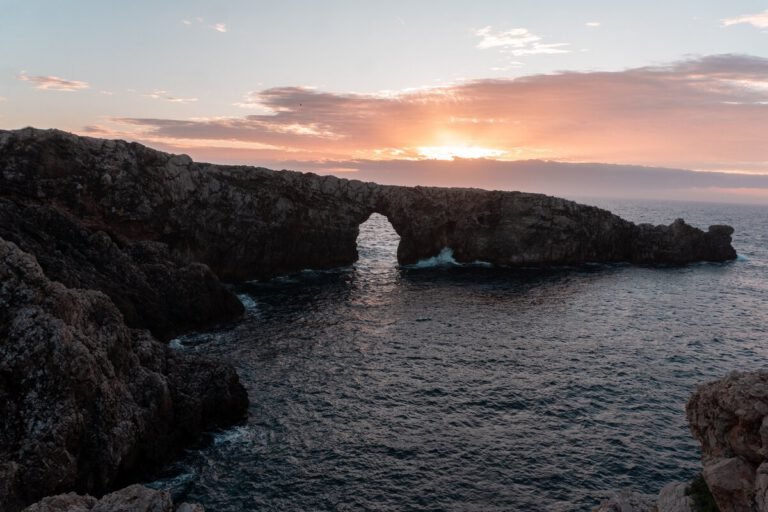
Hard rocks and water on the verge of the city at NewYork
Etiam vitae elit vitae turpis ornare convallis. Nullam risus leo, condimentum eu justo imperdiet, facilisis tincidunt…
Read MoreEtiam vitae elit vitae turpis ornare convallis. Nullam risus leo, condimentum eu justo imperdiet, facilisis tincidunt…
Read MoreEtiam vitae elit vitae turpis ornare convallis. Nullam risus leo, condimentum eu justo imperdiet, facilisis tincidunt…
Read MoreEtiam vitae elit vitae turpis ornare convallis. Nullam risus leo, condimentum eu justo imperdiet, facilisis tincidunt…
Read MoreLorem ipsum dolor sit amet, consectetur adipiscing elit. Sed posuere odio elit, ac vestibulum quam rutrum…
Read MoreEtiam vitae elit vitae turpis ornare convallis. Nullam risus leo, condimentum eu justo imperdiet, facilisis tincidunt…
Read MoreEtiam vitae elit vitae turpis ornare convallis. Nullam risus leo, condimentum eu justo imperdiet, facilisis tincidunt…
Read MoreEtiam vitae elit vitae turpis ornare convallis. Nullam risus leo, condimentum eu justo imperdiet, facilisis tincidunt…
Read MoreLorem ipsum dolor sit amet, consectetur adipiscing elit. Sed posuere odio elit, ac vestibulum quam rutrum…
Read MoreEtiam vitae elit vitae turpis ornare convallis. Nullam risus leo, condimentum eu justo imperdiet, facilisis tincidunt…
Read MoreEtiam vitae elit vitae turpis ornare convallis. Nullam risus leo, condimentum eu justo imperdiet, facilisis tincidunt…
Read MoreEtiam vitae elit vitae turpis ornare convallis. Nullam risus leo, condimentum eu justo imperdiet, facilisis tincidunt…
Read MoreLorem ipsum dolor sit amet, consectetur adipiscing elit. Sed posuere odio elit, ac vestibulum quam rutrum…
Read MoreEtiam vitae elit vitae turpis ornare convallis. Nullam risus leo, condimentum eu justo imperdiet, facilisis tincidunt…
Read MoreEtiam vitae elit vitae turpis ornare convallis. Nullam risus leo, condimentum eu justo imperdiet, facilisis tincidunt…
Read MoreEtiam vitae elit vitae turpis ornare convallis. Nullam risus leo, condimentum eu justo imperdiet, facilisis tincidunt…
Read MoreLorem ipsum dolor sit amet, consectetur adipiscing elit. Sed posuere odio elit, ac vestibulum quam rutrum…
Read MoreEtiam vitae elit vitae turpis ornare convallis. Nullam risus leo, condimentum eu justo imperdiet, facilisis tincidunt…
Read MoreEtiam vitae elit vitae turpis ornare convallis. Nullam risus leo, condimentum eu justo imperdiet, facilisis tincidunt…
Read MoreEtiam vitae elit vitae turpis ornare convallis. Nullam risus leo, condimentum eu justo imperdiet, facilisis tincidunt…
Read MoreLorem ipsum dolor sit amet, consectetur adipiscing elit. Sed posuere odio elit, ac vestibulum quam rutrum…
Read MoreEtiam vitae elit vitae turpis ornare convallis. Nullam risus leo, condimentum eu justo imperdiet, facilisis tincidunt…
Read MoreEtiam vitae elit vitae turpis ornare convallis. Nullam risus leo, condimentum eu justo imperdiet, facilisis tincidunt…
Read MoreEtiam vitae elit vitae turpis ornare convallis. Nullam risus leo, condimentum eu justo imperdiet, facilisis tincidunt…
Read MoreLorem ipsum dolor sit amet, consectetur adipiscing elit. Sed posuere odio elit, ac vestibulum quam rutrum…
Read MoreEtiam vitae elit vitae turpis ornare convallis. Nullam risus leo, condimentum eu justo imperdiet, facilisis tincidunt…
Read MoreEtiam vitae elit vitae turpis ornare convallis. Nullam risus leo, condimentum eu justo imperdiet, facilisis tincidunt…
Read MoreEtiam vitae elit vitae turpis ornare convallis. Nullam risus leo, condimentum eu justo imperdiet, facilisis tincidunt…
Read MoreLorem ipsum dolor sit amet, consectetur adipiscing elit. Sed posuere odio elit, ac vestibulum quam rutrum…
Read MoreEtiam vitae elit vitae turpis ornare convallis. Nullam risus leo, condimentum eu justo imperdiet, facilisis tincidunt…
Read MoreEtiam vitae elit vitae turpis ornare convallis. Nullam risus leo, condimentum eu justo imperdiet, facilisis tincidunt…
Read MoreEtiam vitae elit vitae turpis ornare convallis. Nullam risus leo, condimentum eu justo imperdiet, facilisis tincidunt…
Read MoreLorem ipsum dolor sit amet, consectetur adipiscing elit. Sed posuere odio elit, ac vestibulum quam rutrum…
Read MoreEtiam vitae elit vitae turpis ornare convallis. Nullam risus leo, condimentum eu justo imperdiet, facilisis tincidunt…
Read MoreEtiam vitae elit vitae turpis ornare convallis. Nullam risus leo, condimentum eu justo imperdiet, facilisis tincidunt…
Read MoreEtiam vitae elit vitae turpis ornare convallis. Nullam risus leo, condimentum eu justo imperdiet, facilisis tincidunt…
Read MoreLorem ipsum dolor sit amet, consectetur adipiscing elit. Sed posuere odio elit, ac vestibulum quam rutrum…
Read MoreEtiam vitae elit vitae turpis ornare convallis. Nullam risus leo, condimentum eu justo imperdiet, facilisis tincidunt…
Read MoreEtiam vitae elit vitae turpis ornare convallis. Nullam risus leo, condimentum eu justo imperdiet, facilisis tincidunt…
Read MoreEtiam vitae elit vitae turpis ornare convallis. Nullam risus leo, condimentum eu justo imperdiet, facilisis tincidunt…
Read MoreLorem ipsum dolor sit amet, consectetur adipiscing elit. Sed posuere odio elit, ac vestibulum quam rutrum…
Read MoreEtiam vitae elit vitae turpis ornare convallis. Nullam risus leo, condimentum eu justo imperdiet, facilisis tincidunt…
Read MoreEtiam vitae elit vitae turpis ornare convallis. Nullam risus leo, condimentum eu justo imperdiet, facilisis tincidunt…
Read MoreEtiam vitae elit vitae turpis ornare convallis. Nullam risus leo, condimentum eu justo imperdiet, facilisis tincidunt…
Read MoreLorem ipsum dolor sit amet, consectetur adipiscing elit. Sed posuere odio elit, ac vestibulum quam rutrum…
Read MoreEtiam vitae elit vitae turpis ornare convallis. Nullam risus leo, condimentum eu justo imperdiet, facilisis tincidunt…
Read MoreEtiam vitae elit vitae turpis ornare convallis. Nullam risus leo, condimentum eu justo imperdiet, facilisis tincidunt…
Read MoreEtiam vitae elit vitae turpis ornare convallis. Nullam risus leo, condimentum eu justo imperdiet, facilisis tincidunt…
Read MoreLorem ipsum dolor sit amet, consectetur adipiscing elit. Sed posuere odio elit, ac vestibulum quam rutrum…
Read MoreEtiam vitae elit vitae turpis ornare convallis. Nullam risus leo, condimentum eu justo imperdiet, facilisis tincidunt…
Read MoreEtiam vitae elit vitae turpis ornare convallis. Nullam risus leo, condimentum eu justo imperdiet, facilisis tincidunt…
Read MoreEtiam vitae elit vitae turpis ornare convallis. Nullam risus leo, condimentum eu justo imperdiet, facilisis tincidunt…
Read MoreLorem ipsum dolor sit amet, consectetur adipiscing elit. Sed posuere odio elit, ac vestibulum quam rutrum…
Read MoreEtiam vitae elit vitae turpis ornare convallis. Nullam risus leo, condimentum eu justo imperdiet, facilisis tincidunt…
Read MoreEtiam vitae elit vitae turpis ornare convallis. Nullam risus leo, condimentum eu justo imperdiet, facilisis tincidunt…
Read MoreEtiam vitae elit vitae turpis ornare convallis. Nullam risus leo, condimentum eu justo imperdiet, facilisis tincidunt…
Read MoreLorem ipsum dolor sit amet, consectetur adipiscing elit. Sed posuere odio elit, ac vestibulum quam rutrum…
Read MoreEtiam vitae elit vitae turpis ornare convallis. Nullam risus leo, condimentum eu justo imperdiet, facilisis tincidunt…
Read MoreEtiam vitae elit vitae turpis ornare convallis. Nullam risus leo, condimentum eu justo imperdiet, facilisis tincidunt…
Read MoreEtiam vitae elit vitae turpis ornare convallis. Nullam risus leo, condimentum eu justo imperdiet, facilisis tincidunt…
Read MoreLorem ipsum dolor sit amet, consectetur adipiscing elit. Sed posuere odio elit, ac vestibulum quam rutrum…
Read MoreEtiam vitae elit vitae turpis ornare convallis. Nullam risus leo, condimentum eu justo imperdiet, facilisis tincidunt…
Read MoreEtiam vitae elit vitae turpis ornare convallis. Nullam risus leo, condimentum eu justo imperdiet, facilisis tincidunt…
Read MoreEtiam vitae elit vitae turpis ornare convallis. Nullam risus leo, condimentum eu justo imperdiet, facilisis tincidunt…
Read MoreLorem ipsum dolor sit amet, consectetur adipiscing elit. Sed posuere odio elit, ac vestibulum quam rutrum…
Read MoreEtiam vitae elit vitae turpis ornare convallis. Nullam risus leo, condimentum eu justo imperdiet, facilisis tincidunt…
Read MoreEtiam vitae elit vitae turpis ornare convallis. Nullam risus leo, condimentum eu justo imperdiet, facilisis tincidunt…
Read MoreEtiam vitae elit vitae turpis ornare convallis. Nullam risus leo, condimentum eu justo imperdiet, facilisis tincidunt…
Read MoreLorem ipsum dolor sit amet, consectetur adipiscing elit. Sed posuere odio elit, ac vestibulum quam rutrum…
Read MoreEtiam vitae elit vitae turpis ornare convallis. Nullam risus leo, condimentum eu justo imperdiet, facilisis tincidunt…
Read MoreEtiam vitae elit vitae turpis ornare convallis. Nullam risus leo, condimentum eu justo imperdiet, facilisis tincidunt…
Read MoreEtiam vitae elit vitae turpis ornare convallis. Nullam risus leo, condimentum eu justo imperdiet, facilisis tincidunt…
Read MoreLorem ipsum dolor sit amet, consectetur adipiscing elit. Sed posuere odio elit, ac vestibulum quam rutrum…
Read MoreEtiam vitae elit vitae turpis ornare convallis. Nullam risus leo, condimentum eu justo imperdiet, facilisis tincidunt…
Read MoreEtiam vitae elit vitae turpis ornare convallis. Nullam risus leo, condimentum eu justo imperdiet, facilisis tincidunt…
Read MoreEtiam vitae elit vitae turpis ornare convallis. Nullam risus leo, condimentum eu justo imperdiet, facilisis tincidunt…
Read MoreLorem ipsum dolor sit amet, consectetur adipiscing elit. Sed posuere odio elit, ac vestibulum quam rutrum…
Read MoreEtiam vitae elit vitae turpis ornare convallis. Nullam risus leo, condimentum eu justo imperdiet, facilisis tincidunt…
Read MoreEtiam vitae elit vitae turpis ornare convallis. Nullam risus leo, condimentum eu justo imperdiet, facilisis tincidunt…
Read MoreEtiam vitae elit vitae turpis ornare convallis. Nullam risus leo, condimentum eu justo imperdiet, facilisis tincidunt…
Read MoreLorem ipsum dolor sit amet, consectetur adipiscing elit. Sed posuere odio elit, ac vestibulum quam rutrum…
Read MoreEtiam vitae elit vitae turpis ornare convallis. Nullam risus leo, condimentum eu justo imperdiet, facilisis tincidunt…
Read MoreEtiam vitae elit vitae turpis ornare convallis. Nullam risus leo, condimentum eu justo imperdiet, facilisis tincidunt…
Read MoreEtiam vitae elit vitae turpis ornare convallis. Nullam risus leo, condimentum eu justo imperdiet, facilisis tincidunt…
Read MoreLorem ipsum dolor sit amet, consectetur adipiscing elit. Sed posuere odio elit, ac vestibulum quam rutrum…
Read MoreEtiam vitae elit vitae turpis ornare convallis. Nullam risus leo, condimentum eu justo imperdiet, facilisis tincidunt…
Read MoreEtiam vitae elit vitae turpis ornare convallis. Nullam risus leo, condimentum eu justo imperdiet, facilisis tincidunt…
Read MoreEtiam vitae elit vitae turpis ornare convallis. Nullam risus leo, condimentum eu justo imperdiet, facilisis tincidunt…
Read MoreLorem ipsum dolor sit amet, consectetur adipiscing elit. Sed posuere odio elit, ac vestibulum quam rutrum…
Read MoreEtiam vitae elit vitae turpis ornare convallis. Nullam risus leo, condimentum eu justo imperdiet, facilisis tincidunt…
Read MoreEtiam vitae elit vitae turpis ornare convallis. Nullam risus leo, condimentum eu justo imperdiet, facilisis tincidunt…
Read MoreEtiam vitae elit vitae turpis ornare convallis. Nullam risus leo, condimentum eu justo imperdiet, facilisis tincidunt…
Read MoreLorem ipsum dolor sit amet, consectetur adipiscing elit. Sed posuere odio elit, ac vestibulum quam rutrum…
Read MoreEtiam vitae elit vitae turpis ornare convallis. Nullam risus leo, condimentum eu justo imperdiet, facilisis tincidunt…
Read MoreEtiam vitae elit vitae turpis ornare convallis. Nullam risus leo, condimentum eu justo imperdiet, facilisis tincidunt…
Read MoreEtiam vitae elit vitae turpis ornare convallis. Nullam risus leo, condimentum eu justo imperdiet, facilisis tincidunt…
Read MoreLorem ipsum dolor sit amet, consectetur adipiscing elit. Sed posuere odio elit, ac vestibulum quam rutrum…
Read MoreEtiam vitae elit vitae turpis ornare convallis. Nullam risus leo, condimentum eu justo imperdiet, facilisis tincidunt…
Read MoreEtiam vitae elit vitae turpis ornare convallis. Nullam risus leo, condimentum eu justo imperdiet, facilisis tincidunt…
Read MoreEtiam vitae elit vitae turpis ornare convallis. Nullam risus leo, condimentum eu justo imperdiet, facilisis tincidunt…
Read MoreLorem ipsum dolor sit amet, consectetur adipiscing elit. Sed posuere odio elit, ac vestibulum quam rutrum…
Read MoreEtiam vitae elit vitae turpis ornare convallis. Nullam risus leo, condimentum eu justo imperdiet, facilisis tincidunt…
Read MoreEtiam vitae elit vitae turpis ornare convallis. Nullam risus leo, condimentum eu justo imperdiet, facilisis tincidunt…
Read MoreEtiam vitae elit vitae turpis ornare convallis. Nullam risus leo, condimentum eu justo imperdiet, facilisis tincidunt…
Read MoreLorem ipsum dolor sit amet, consectetur adipiscing elit. Sed posuere odio elit, ac vestibulum quam rutrum…
Read MoreEtiam vitae elit vitae turpis ornare convallis. Nullam risus leo, condimentum eu justo imperdiet, facilisis tincidunt…
Read MoreEtiam vitae elit vitae turpis ornare convallis. Nullam risus leo, condimentum eu justo imperdiet, facilisis tincidunt…
Read MoreEtiam vitae elit vitae turpis ornare convallis. Nullam risus leo, condimentum eu justo imperdiet, facilisis tincidunt…
Read MoreLorem ipsum dolor sit amet, consectetur adipiscing elit. Sed posuere odio elit, ac vestibulum quam rutrum…
Read MoreEtiam vitae elit vitae turpis ornare convallis. Nullam risus leo, condimentum eu justo imperdiet, facilisis tincidunt…
Read MoreEtiam vitae elit vitae turpis ornare convallis. Nullam risus leo, condimentum eu justo imperdiet, facilisis tincidunt…
Read MoreEtiam vitae elit vitae turpis ornare convallis. Nullam risus leo, condimentum eu justo imperdiet, facilisis tincidunt…
Read MoreLorem ipsum dolor sit amet, consectetur adipiscing elit. Sed posuere odio elit, ac vestibulum quam rutrum…
Read MoreEtiam vitae elit vitae turpis ornare convallis. Nullam risus leo, condimentum eu justo imperdiet, facilisis tincidunt…
Read MoreEtiam vitae elit vitae turpis ornare convallis. Nullam risus leo, condimentum eu justo imperdiet, facilisis tincidunt…
Read MoreEtiam vitae elit vitae turpis ornare convallis. Nullam risus leo, condimentum eu justo imperdiet, facilisis tincidunt…
Read MoreLorem ipsum dolor sit amet, consectetur adipiscing elit. Sed posuere odio elit, ac vestibulum quam rutrum…
Read MoreEtiam vitae elit vitae turpis ornare convallis. Nullam risus leo, condimentum eu justo imperdiet, facilisis tincidunt…
Read MoreEtiam vitae elit vitae turpis ornare convallis. Nullam risus leo, condimentum eu justo imperdiet, facilisis tincidunt…
Read MoreEtiam vitae elit vitae turpis ornare convallis. Nullam risus leo, condimentum eu justo imperdiet, facilisis tincidunt…
Read MoreLorem ipsum dolor sit amet, consectetur adipiscing elit. Sed posuere odio elit, ac vestibulum quam rutrum…
Read MoreEtiam vitae elit vitae turpis ornare convallis. Nullam risus leo, condimentum eu justo imperdiet, facilisis tincidunt…
Read MoreEtiam vitae elit vitae turpis ornare convallis. Nullam risus leo, condimentum eu justo imperdiet, facilisis tincidunt…
Read MoreEtiam vitae elit vitae turpis ornare convallis. Nullam risus leo, condimentum eu justo imperdiet, facilisis tincidunt…
Read MoreLorem ipsum dolor sit amet, consectetur adipiscing elit. Sed posuere odio elit, ac vestibulum quam rutrum…
Read MoreEtiam vitae elit vitae turpis ornare convallis. Nullam risus leo, condimentum eu justo imperdiet, facilisis tincidunt…
Read MoreEtiam vitae elit vitae turpis ornare convallis. Nullam risus leo, condimentum eu justo imperdiet, facilisis tincidunt…
Read MoreEtiam vitae elit vitae turpis ornare convallis. Nullam risus leo, condimentum eu justo imperdiet, facilisis tincidunt…
Read MoreLorem ipsum dolor sit amet, consectetur adipiscing elit. Sed posuere odio elit, ac vestibulum quam rutrum…
Read MoreEtiam vitae elit vitae turpis ornare convallis. Nullam risus leo, condimentum eu justo imperdiet, facilisis tincidunt…
Read MoreEtiam vitae elit vitae turpis ornare convallis. Nullam risus leo, condimentum eu justo imperdiet, facilisis tincidunt…
Read MoreEtiam vitae elit vitae turpis ornare convallis. Nullam risus leo, condimentum eu justo imperdiet, facilisis tincidunt…
Read MoreLorem ipsum dolor sit amet, consectetur adipiscing elit. Sed posuere odio elit, ac vestibulum quam rutrum…
Read MoreEtiam vitae elit vitae turpis ornare convallis. Nullam risus leo, condimentum eu justo imperdiet, facilisis tincidunt…
Read MoreEtiam vitae elit vitae turpis ornare convallis. Nullam risus leo, condimentum eu justo imperdiet, facilisis tincidunt…
Read MoreEtiam vitae elit vitae turpis ornare convallis. Nullam risus leo, condimentum eu justo imperdiet, facilisis tincidunt…
Read MoreLorem ipsum dolor sit amet, consectetur adipiscing elit. Sed posuere odio elit, ac vestibulum quam rutrum…
Read MoreEtiam vitae elit vitae turpis ornare convallis. Nullam risus leo, condimentum eu justo imperdiet, facilisis tincidunt…
Read MoreEtiam vitae elit vitae turpis ornare convallis. Nullam risus leo, condimentum eu justo imperdiet, facilisis tincidunt…
Read MoreEtiam vitae elit vitae turpis ornare convallis. Nullam risus leo, condimentum eu justo imperdiet, facilisis tincidunt…
Read MoreLorem ipsum dolor sit amet, consectetur adipiscing elit. Sed posuere odio elit, ac vestibulum quam rutrum…
Read MoreEtiam vitae elit vitae turpis ornare convallis. Nullam risus leo, condimentum eu justo imperdiet, facilisis tincidunt…
Read MoreEtiam vitae elit vitae turpis ornare convallis. Nullam risus leo, condimentum eu justo imperdiet, facilisis tincidunt…
Read MoreEtiam vitae elit vitae turpis ornare convallis. Nullam risus leo, condimentum eu justo imperdiet, facilisis tincidunt…
Read MoreLorem ipsum dolor sit amet, consectetur adipiscing elit. Sed posuere odio elit, ac vestibulum quam rutrum…
Read MoreEtiam vitae elit vitae turpis ornare convallis. Nullam risus leo, condimentum eu justo imperdiet, facilisis tincidunt…
Read MoreEtiam vitae elit vitae turpis ornare convallis. Nullam risus leo, condimentum eu justo imperdiet, facilisis tincidunt…
Read MoreEtiam vitae elit vitae turpis ornare convallis. Nullam risus leo, condimentum eu justo imperdiet, facilisis tincidunt…
Read MoreLorem ipsum dolor sit amet, consectetur adipiscing elit. Sed posuere odio elit, ac vestibulum quam rutrum…
Read MoreEtiam vitae elit vitae turpis ornare convallis. Nullam risus leo, condimentum eu justo imperdiet, facilisis tincidunt…
Read MoreEtiam vitae elit vitae turpis ornare convallis. Nullam risus leo, condimentum eu justo imperdiet, facilisis tincidunt…
Read MoreEtiam vitae elit vitae turpis ornare convallis. Nullam risus leo, condimentum eu justo imperdiet, facilisis tincidunt…
Read MoreLorem ipsum dolor sit amet, consectetur adipiscing elit. Sed posuere odio elit, ac vestibulum quam rutrum…
Read MoreEtiam vitae elit vitae turpis ornare convallis. Nullam risus leo, condimentum eu justo imperdiet, facilisis tincidunt…
Read MoreEtiam vitae elit vitae turpis ornare convallis. Nullam risus leo, condimentum eu justo imperdiet, facilisis tincidunt…
Read MoreEtiam vitae elit vitae turpis ornare convallis. Nullam risus leo, condimentum eu justo imperdiet, facilisis tincidunt…
Read MoreLorem ipsum dolor sit amet, consectetur adipiscing elit. Sed posuere odio elit, ac vestibulum quam rutrum…
Read MoreEtiam vitae elit vitae turpis ornare convallis. Nullam risus leo, condimentum eu justo imperdiet, facilisis tincidunt…
Read MoreEtiam vitae elit vitae turpis ornare convallis. Nullam risus leo, condimentum eu justo imperdiet, facilisis tincidunt…
Read MoreEtiam vitae elit vitae turpis ornare convallis. Nullam risus leo, condimentum eu justo imperdiet, facilisis tincidunt…
Read MoreLorem ipsum dolor sit amet, consectetur adipiscing elit. Sed posuere odio elit, ac vestibulum quam rutrum…
Read MoreEtiam vitae elit vitae turpis ornare convallis. Nullam risus leo, condimentum eu justo imperdiet, facilisis tincidunt…
Read MoreEtiam vitae elit vitae turpis ornare convallis. Nullam risus leo, condimentum eu justo imperdiet, facilisis tincidunt…
Read MoreEtiam vitae elit vitae turpis ornare convallis. Nullam risus leo, condimentum eu justo imperdiet, facilisis tincidunt…
Read MoreLorem ipsum dolor sit amet, consectetur adipiscing elit. Sed posuere odio elit, ac vestibulum quam rutrum…
Read More