How I Plan a Theme Before Writing Code
Six weeks of research for six weeks of building.
 Cole Bennett6 min read
I don’t open my code editor until I have read two hundred buyer comments on similar themes. That rule has shaped every theme I have released in the past six years, and it is the reason my planning phase now takes as long as the building phase. Six weeks of research for six weeks of building sounds slow, but it has saved me from launching themes nobody wanted, and it has given me feature lists that sell themselves. Buyers tell you exactly what they wish existed. You just have to read carefully, take good notes and resist the urge to start designing on day one.
Why I stopped starting with design
My first two themes began with a mood board. I collected beautiful screenshots, picked fonts I loved and built pages that looked great to me. One of them did fine. The other barely sold. When I looked back, the difference was obvious. The successful one happened to solve a real problem for a specific kind of buyer. The other one solved nothing in particular. It was just pretty.
After that, I flipped the order. Now the first question is not “What would look amazing?” but “What are people in this niche struggling with?” Design still matters enormously, but it comes after I understand the job the theme has to do. A beautiful header is wasted if the buyer actually needed a booking form that works on phones.
The comment spreadsheet
Every request goes in a sheet, tagged by theme. The top ten requests become the feature list. It is the least glamorous part of my process and easily the most valuable.
When I am considering a new niche, I find the most popular themes in that category on the marketplace and read through their comment sections and public reviews, going back a year or two. I am not looking for complaints about bugs. I am looking for sentences that start with “Is it possible to…,” “Does this theme support…,” or “I wish there was a way to….” Those are buyers describing features that don’t exist yet.
How the sheet is organized
- Request: The feature in plain words, such as “show menu prices by size.”
- Source theme: Which theme the comment came from, so I can spot patterns.
- Count: How many times I have seen the same request across all themes.
- Type: Layout, feature, integration, speed or support.
- Notes: Any detail about why the buyer wanted it.
After two hundred comments, a few rows always rise to the top with far higher counts than the rest. Those become the core of the new theme. Anything mentioned only once or twice goes in a “maybe later” tab. I revisit that tab after launch, because sometimes my own buyers ask for the same thing.
The best feature list is written by other people’s buyers.
Cole Bennett, theme author
One niche, done properly
A real estate theme should feel like it was made by someone who has sold a house. That idea guides the second half of my planning. Reading comments tells me what features are missing. Understanding the niche tells me how those features should actually work.
When I planned Harbor, my real estate theme, I spent time with three local agents. I sat in on a listing appointment, watched how they used their phones between showings and asked what annoyed them most about their current websites. One agent told me she spent an hour every Sunday copying listings from one place to another. Another said clients always asked about school zones, which her site couldn’t show. Those conversations shaped Harbor more than any design trend.
For a restaurant theme, I talk to owners and managers about Friday nights. For a fitness theme, I ask trainers how members book classes. You don’t need to become an expert, but you do need to understand the daily rhythm of the people who will rely on your work.
Questions I ask people in the niche
- What do customers ask you most often by phone or email?
- What do you update on your website every week?
- Which part of your current site do you avoid touching?
- What does a competitor’s site do that you envy?
- If your site could do one new thing tomorrow, what would it be?
From research to a written plan
With the spreadsheet and interviews done, I write a short plan before any design work starts. It fits on two pages and has four parts: who the theme is for, the ten core features, the pages each demo needs and what the theme will deliberately not do. That last part is important. Saying no on paper is much easier than saying no halfway through development, when every feature feels urgent.
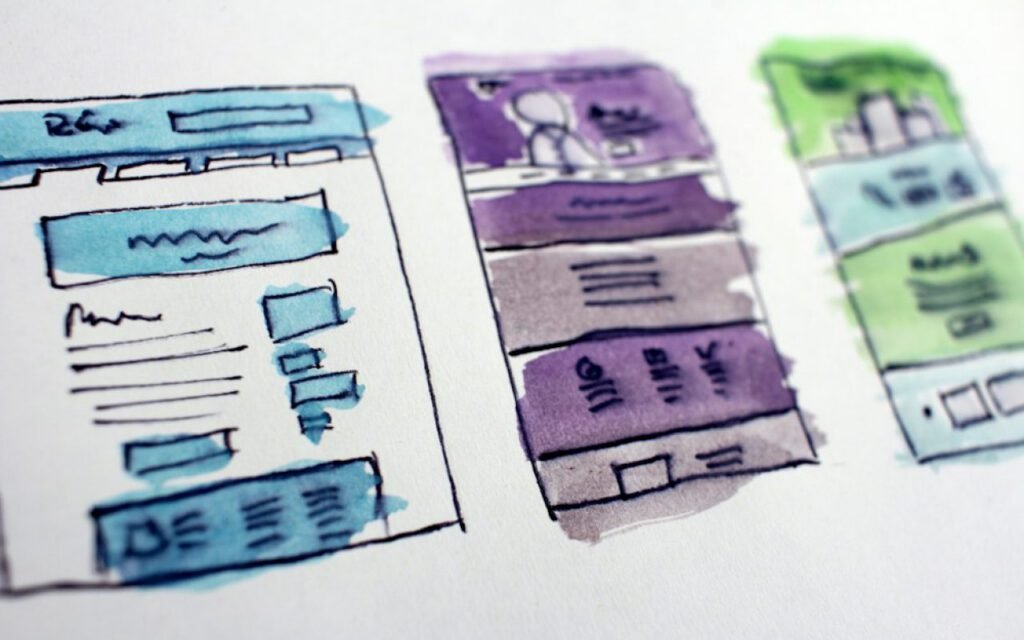
Next come rough wireframes. I draw them loosely, often with watercolor washes or quick marker sketches, so I don’t fall in love with details too early. Each wireframe answers a question from the plan: where does the booking button live, how does the menu look on a phone, what does a visitor see first on the homepage. Only when the wireframes feel right do I move to polished designs.
What the six weeks look like
People often ask how the time breaks down, so here is a typical planning schedule. It shifts a little depending on the niche, but the order rarely changes.
- Weeks one and two: Reading comments and reviews, building the spreadsheet.
- Week three: Conversations with people who work in the niche.
- Week four: Writing the two-page plan and deciding what to leave out.
- Week five: Wireframes for every key page and the mobile layouts.
- Week six: Final designs for the homepage and two inner pages, plus a short style guide.
Then I open the code editor. Because the plan is clear, building tends to go smoothly. I rarely rewrite major parts, and I rarely add surprise features near the end. The theme I launch is very close to the theme I planned.
Key takeaway: Read before you design, talk to real people in the niche, write down what you won’t build, and the code becomes the easy part.
Planning never really stops
Launch day doesn’t end the research. It simply changes the source. After a theme goes live, my own buyers become the comment section I read every morning. Their requests go into a new tab in the same spreadsheet, and the patterns shape the first few updates. Many of my most popular features were added in the months after launch because buyers told me what they needed once they started building real sites.
If you are planning your first theme, try the spreadsheet for just one week. Read fifty comments in your chosen niche and count the repeats. I would be surprised if you didn’t find at least three features worth building. Listen closely, plan carefully and let the people who will use your work help you write it.

Cole Bennett
Cole builds fast WordPress themes and answers every support ticket within a day.





2 Comments
Sharing this with my friends.
Saved this one for later. Really useful.